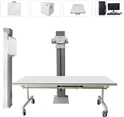

Medical X-ray machines are critical tools in diagnostic imaging, aiding in the detection and diagnosis of various medical conditions. However, like any complex machinery, they can encounter issues that impact their performance and reliability. In this article, we will explore common problems faced by medical X-ray machines and provide solutions and troubleshooting techniques to address them effectively.
Image Quality Issues
- Problem: Poor image quality, including blurriness, artifacts, or inadequate contrast, can hinder accurate diagnoses.
- Solution: To address image quality issues, several steps can be taken:
- Ensure Proper Patient Positioning and Immobilization: Optimal image capture starts with proper patient positioning and immobilization to prevent movement during the exposure.
- Verify Exposure Parameters: Ensure that the kilovoltage (kVp) and milliamperage (mA) settings are appropriate for the body part being imaged. Adjust these parameters if necessary.
- Check Collimation and Beam Alignment: Proper collimation and beam alignment are crucial to minimize scatter radiation and enhance image clarity.
- Regular Calibration and Maintenance: Regularly calibrate and maintain the X-ray machine and image receptor to ensure optimal performance.
- Consult Manufacturer's Guidelines: Follow the manufacturer's guidelines for troubleshooting and seek technical support if needed.
Equipment Malfunction or Downtime
- Problem: Equipment malfunction or downtime can disrupt clinical workflows and delay patient care.
- Solution: To address equipment malfunction or downtime:
- Preventive Maintenance: Perform regular preventive maintenance and inspections as recommended by the manufacturer.
- Scheduled Maintenance Program: Establish a scheduled maintenance program to identify and address potential issues proactively.
- Staff Training: Train and educate staff on proper equipment operation and maintenance procedures.
- Backup Plan: Maintain a backup plan or access to alternative imaging facilities to minimize the impact of equipment downtime.
- Prompt Reporting: Report any malfunctions to the appropriate technical support or service provider for timely resolution.
-
Radiation Safety Concerns
- Problem: Ensuring radiation safety for patients, staff, and the general public is crucial.
- Solution: To address radiation safety concerns:
- Radiation Shielding: Implement appropriate radiation shielding measures, such as lead aprons and protective barriers.
- Monitor Radiation Levels: Regularly monitor radiation levels and perform quality assurance checks to ensure compliance with safety standards.
- Staff Training on Radiation Safety: Provide comprehensive training to staff on radiation safety practices and procedures.
- Adhere to ALARA Principles: Follow established protocols for patient radiation dose optimization and adhere to ALARA (As Low As Reasonably Achievable) principles.
- Stay Updated with Guidelines: Keep updated with current guidelines and regulations related to radiation safety in medical imaging.
-
Software and Technological Issues
- Problem: X-ray machines rely on software and technology, and issues with these components can affect their performance.
No Display on the Console After Booting
- Solution: Power failure check:
- Check Power Indicator: Ensure the indicator light on the power switch of the console is on. If not:
- Check the power outlet for power.
- Verify that the connectors at both ends of the power cord are properly plugged in.
- Ensure the connection between the console and the column is secure.
- Check if the fuse is blown and whether the fuse holder is in good condition.
- Verify the power switch functionality.
- Internal Connections: If the power indicator is on, check:
- Whether the connecting wires of the control board in the console are loose.
- For any issues with circuit board components and soldering.
Exposure at Startup
- Solution: Shutdown check:
- Exposure Switch: Remove the hand exposure switch (hand brake) from the console, and remove the battery from the remote control. Turn on the machine and check if the exposure continues. If it does not expose:
- Inspect the exposure switch of the hand brake and the remote control to ensure they are not stuck.
- Relay Inspection: If the switches are normal, check if the relay on the control board is stuck.
- Hand Switch Socket: Check if the hand switch socket of the console is normal and look for any short circuit issues with touching parts, welding, or wiring on the control board.
Burn Insurance When Exposed
- Solution: Shutdown check:
- Connector Inspection: Unplug the connector between the console and the column, start the exposure, and check if the console works normally (exposure light on, buzzer sounds, digital tube countdown to 0.00). If not normal:
- Check inside the console for cable or short circuit issues. If none, replace the console.
- X-ray Source Assembly: Insert the connector between the console and the column, push the X-ray source assembly (machine head) to the highest position and remove it. Turn on the machine and check if the console works normally. If not:
- Check the column and bracket for short-circuited or worn wires.
- Diode and Resistor Check: If all checks are normal, inspect the diode and 300 ohm adjustable resistor in the console for damage.
- Component Replacement: If still unresolved, replace the X-ray source assembly (handpiece). If uncertain, replace both the console and handpiece.
- Solution: To address software and technological issues:
- Regular Updates: Regularly update the X-ray machine's software and firmware to benefit from bug fixes and performance enhancements.
- Proper Installation Procedures: Follow proper procedures for software installation, including compatibility checks and backups.
- Consult Technical Support: Troubleshoot software-related issues by consulting the user manual or contacting technical support.
- Training Programs: Keep up with advancements in X-ray technology and consider training programs or workshops to enhance technical expertise.
Conclusion
Common problems encountered with medical X-ray machines can be effectively addressed through proper troubleshooting techniques and preventive maintenance. By ensuring optimal image quality, addressing equipment malfunctions, maintaining radiation safety, and staying up-to-date with software and technological advancements, healthcare providers can maximize the reliability and performance of their X-ray machines. Regular training, collaboration with technical support, and adherence to industry best practices are essential for overcoming challenges and ensuring smooth operations in medical imaging facilities. By implementing these strategies, healthcare providers can ensure accurate diagnostics and improved patient care.